ir-bt-bridge
ir-bt-bridge turns any IR remote into a Bluetooth (BLE HID) remote for Google TV. An ESP32-S3 receives the remote’s IR codes, looks each one up in a keymap and sends the mapped key to the TV as a paired Bluetooth remote.
[Any IR Remote] → [IR receiver] → [ESP32-S3] → [BLE HID] → [Google TV]
                                      │
                        [USB-C] ←→ [irbt CLI / library on a PC]
The keymap is edited over USB at runtime, so changing it needs no reflash.
Use the irbt command-line tool, or the irbt Rust library to script it.
This guide covers:
- Hardware: parts and wiring.
- Flashing the firmware onto the board.
- Installing and using the
irbtCLI. - Using the
irbtlibrary from your own Rust code. - The wire protocol between the device and the host.
- The API reference of the published crates.
The source is at code.selu.dev/selu/ir-bt-bridge. Building from source is covered in its README.
Hardware
The board is a Waveshare ESP32-S3-Zero (ESP32-S3FH4R2, 4 MB flash, 2 MB PSRAM, BLE 5.0). The full parts list, the design decisions and the build phases are in SPEC.md.
Parts
| Part | Role |
|---|---|
| Waveshare ESP32-S3-Zero | MCU, BLE, USB-C |
| VS1838B IR receiver module | IR receiver (38 kHz) |
| 100 Ω resistor, 100 nF capacitor | supply filter for the IR receiver |
| TSAL-6200 IR LED, 2N2222 transistor, 330 Ω, 33 Ω and 10 kΩ resistors | IR blaster (optional) |
| SS14 Schottky diode, 2× 100 kΩ resistors, 100 nF capacitor | battery input and voltage sense (optional) |
Pins
| Signal | GPIO |
|---|---|
| IR receiver output | GPIO 1 |
| IR blaster (transistor base, via 330 Ω) | GPIO 2 |
| Battery voltage sense (optional) | GPIO 4 |
| Status LED | onboard WS2812 (GPIO 21) |
| USB control link | the USB-C port (built-in USB-Serial-JTAG) |
Schematic
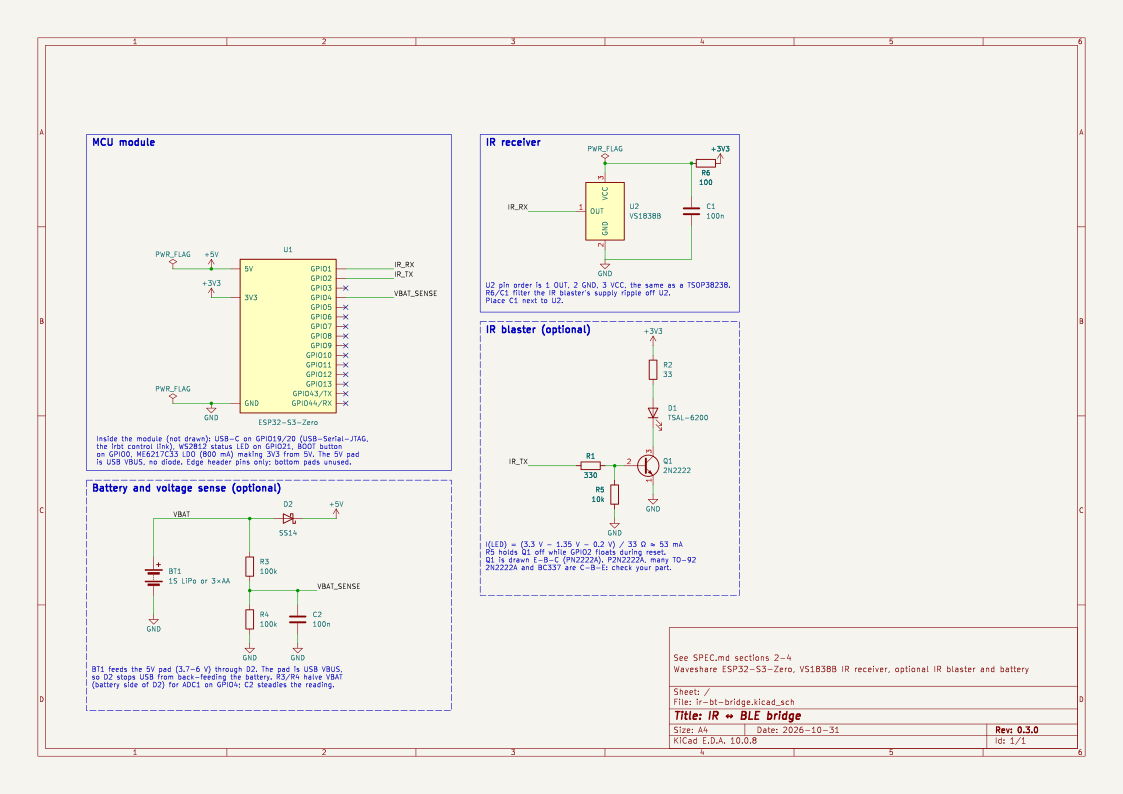
The KiCad project is in
hardware/.
It is a schematic only: the parts have no footprints, and the ESP32-S3-Zero
symbol shows only the edge header pins. The dashed boxes are the optional
parts.
Wiring
The VS1838B’s pin order is OUT, GND, VCC, the same as a TSOP38238.
VS1838B pin 1 (OUT) → GPIO 1
VS1838B pin 2 (GND) → GND
VS1838B pin 3 (VCC) ──[100Ω]── 3.3V
100nF from VCC (after the 100Ω) to GND, close to the module
The 100 Ω and 100 nF filter the receiver’s supply. The IR blaster draws ~53 mA bursts at 38 kHz from the same 3.3 V rail, and that ripple would otherwise reach the receiver’s sensitive amplifier.
The optional IR blaster:
3.3V ──[33Ω]── TSAL-6200 anode (long leg)
               TSAL-6200 cathode (short leg)
                    │
               2N2222 collector
               2N2222 emitter ── GND
               2N2222 base ──[330Ω]── GPIO 2
               2N2222 base ──[10kΩ]── GND
The 10 kΩ keeps the LED off while GPIO 2 floats during reset. The transistor is drawn E-B-C (PN2222A), but the TO-92 pinout depends on the vendor: the P2N2222A, many 2N2222A and the BC337 are C-B-E. Check the datasheet of the part you have.
The optional battery:
battery + ──[SS14, anode → cathode]── "5V" pad
battery + ──[100kΩ]──┬──[100kΩ]── GND
                      ├──[100nF]── GND
                   GPIO 4
battery − ── GND
The module’s “5V” pad is wired straight to USB VBUS, with no diode. Without the Schottky, plugging in USB with a battery attached pushes 5 V into the cells, and the battery feeds the host’s USB port. The divider taps the battery side of the diode, so it reads the battery and not USB. The diode drops about 0.3 V, so use 3×AA, or expect the 3.3 V rail to sag once a LiPo falls below about 3.8 V.
The firmware’s battery-monitor feature (on by default) reads the divider
once a minute and reports the charge to the TV as the Bluetooth battery
level. It assumes 3×AA cells; for a LiPo, set CELL to LIPO_1S in
firmware/src/battery.rs. Without a battery it reports 100%.
Status LED
The onboard RGB LED shows the Bluetooth state:
| LED | Meaning |
|---|---|
| Blue, blinking (2×/s) | No Bluetooth host connected; advertising |
| Green, steady (dim) | Connected and paired to a host |
| Purple flash | A key was sent to the host |
Keys pressed while the LED is blinking blue are dropped (no flash).
Flashing the firmware
Prebuilt firmware is on the releases page:
| File | What |
|---|---|
ir-bt-bridge-<tag>-esp32s3.elf | firmware, for espflash |
ir-bt-bridge-<tag>-esp32s3-merged.bin | firmware as a single image for offset 0x0 |
SHA256SUMS | checksums |
Connect the board’s USB-C port. If flashing fails to connect, hold BOOT while plugging it in to force download mode.
Updating a device
Flash the ELF with espflash. This keeps the stored mappings and pairings:
espflash flash ir-bt-bridge-<tag>-esp32s3.elf
A new board
The merged image needs only esptool (or a browser-based flasher), but it
erases the mappings and pairings because it overwrites NVS:
esptool.py --chip esp32s3 write_flash 0x0 ir-bt-bridge-<tag>-esp32s3-merged.bin
After flashing
The device’s USB output is framed binary, so espflash monitor shows
garbage. Use irbt instead:
irbt status
irbt monitor --logs
To pair with the TV, go to Settings → Remotes & Accessories → Add accessory → IR Bridge.
Serial port access
- Linux: your user needs access to the serial port. Join the
dialoutgroup (sudo usermod -aG dialout $USER, then log in again). - WSL2: attach the board to WSL with
usbipd-win
(
usbipd attach --wsl --busid <id>). Re-attach it after every replug or reset into download mode.
Installing the CLI
Prebuilt binaries
The releases page has
irbt for Linux (static, x86_64 and aarch64) and Windows:
| File | What |
|---|---|
irbt-<tag>-{x86_64,aarch64}-linux.tar.gz | static irbt for Linux |
irbt-<tag>-x86_64-windows.zip | irbt.exe |
From the Cargo registry
The crates are published to the Cargo registry on code.selu.dev. Add it to
~/.cargo/config.toml:
[registries.selu]
index = "sparse+https://code.selu.dev/api/packages/selu/cargo/"
Then install the irbt binary (from the irbt-cli crate):
cargo install irbt-cli --registry selu
This also works on macOS, which has no prebuilt binary.
Version
irbt -V shows the version and the commit it was built from, e.g.
0.2.1 (c7f30e8 2026-10-27). irbt --version adds its toolchain and
dependency versions.
Using the CLI
irbt finds the bridge by its USB ID (303A:1001). If several are connected,
or auto-detection fails, pass --port <path> or set IRBT_PORT. irbt ports
lists the detected bridges.
Every command accepts --json for machine-readable output.
Mapping buttons
irbt learn home          # press a remote button to bind it to `home`
irbt list                # show mappings
irbt keys                # all key names
learn waits 10 seconds for a button press (--timeout to change it). To
find a button’s code without mapping it, run irbt monitor and press it.
Mappings can also be edited by code. IR codes are NEC codes, in hex
(0x00FF02FD) or decimal:
irbt set 0x00FF02FD home
irbt rm 0x00FF02FD
irbt clear               # remove every mapping
irbt reset               # restore the firmware's default keymap
Every change is stored on the device right away.
Backing up the keymap
irbt export keymap.toml
irbt import keymap.toml            # add to / overwrite existing mappings
irbt import keymap.toml --replace  # remove all existing mappings first
The file format:
[[mapping]]
ir = "0x00FF02FD"
key = "home"

[[mapping]]
ir = "0x00FF629D"
key = "up"
import checks the whole file before it changes anything on the device.
Testing and debugging
irbt status              # firmware version and build, BLE state, mapping count, battery
irbt monitor             # received IR codes and their keys, until Ctrl-C
irbt monitor --logs      # ... plus the device's log output
irbt send-hid up         # send a key over BLE without IR
irbt send-ir 0x00FF02FD  # transmit a code through the IR blaster
irbt status also shows the firmware’s commit, its rustc, ESP-IDF and crate
versions.
Commands
| Command | Purpose |
|---|---|
irbt status | firmware/protocol version, build info, uptime, BLE state, mapping count, battery |
irbt monitor [--logs] | live IR codes (with mapped key), optionally device logs |
irbt learn <key> | bind the next remote button press to <key> |
irbt list / set <ir> <key> / rm <ir> | inspect/edit mappings |
irbt export <file> / import <file> [--replace] | TOML backup/restore of the keymap |
irbt clear / reset | empty the keymap / restore the built-in defaults |
irbt send-hid <key> | press a key over BLE without IR |
irbt send-ir <code> | fire the IR blaster |
irbt keys / ports | list key names / detected bridges |
irbt help <command> shows the options of each.
Using the irbt library
The irbt crate is the library behind the CLI: port
discovery, framing and a typed client for every command. Add the registry
(see Installing the CLI), then:
cargo add irbt --registry selu
Example
use std::time::Duration;

use irbt::{Device, HidKey, Notification};

fn main() -> Result<(), irbt::Error> {
    let device = Device::open(None)?; // auto-detect the bridge

    let info = device.info()?;
    println!("firmware {} (protocol v{})", info.firmware_version, info.protocol_version);

    device.set_mapping(0x00FF_02FD, HidKey::Home)?;
    for mapping in device.keymap()? {
        println!("0x{:08X} -> {}", mapping.ir, mapping.key);
    }

    // Stream received IR codes.
    device.set_monitor(true)?;
    while let Some(notification) = device.next_notification(Duration::from_secs(30))? {
        if let Notification::Event(event) = notification {
            println!("{event:?}");
        }
    }
    Ok(())
}Device::opentakes a port path, orNoneto pick the only connected bridge.find_portslists them.- Each method sends one command and waits for its reply.
set_timeoutchanges how long it waits. - Events, log lines and unframed output (bootloader text, panic dumps) arrive
as
Notifications throughnext_notification. Device::from_ioruns the client over any reader/writer pair, e.g. in tests.
The protocol types are re-exported from irbt-proto
as irbt::proto.
Wire protocol
The device and the host talk over the ESP32-S3’s built-in USB-Serial-JTAG,
with the protocol in the irbt-proto crate. It
is no_std and shared verbatim by the firmware and the host.
Framing
Every message is a Frame, serialized with
postcard, followed by a CRC-16, COBS-encoded and
delimited by 0x00 bytes on both sides:
0x00 | COBS( postcard(frame) ‖ crc16_le ) | 0x00
COBS guarantees that the encoded body never contains 0x00, so the delimiter is
unambiguous and a receiver can resynchronize at the next 0x00 after
garbage.
All device output, logs included, is framed, so responses, events and logs
share one stream. Bytes that don’t form a valid frame (ROM bootloader text,
panic dumps) are surfaced by the
Decoder as
Decoded::Raw instead of being lost.
Messages
- The host sends a
Request: an id and aCommand. - The device answers each with a response carrying the same id and a
Replyor an error. - Unprompted, the device sends
Events (IR received, learn results, BLE connection changes) andLoglines.
Compatibility
postcard is not self-describing: enum variant order is wire ABI. Variants
and fields are only ever appended at the end, and
PROTOCOL_VERSION is bumped
for anything that changes existing encodings. Golden tests in the crate pin
the bytes. irbt status shows the firmware’s protocol version.
API reference
rustdoc for the published crates:
irbt: host library for configuring and controlling a bridge over USB.irbt_proto: the wire protocol, shared by the firmware and the host.irbt_build_info: build-script helper that embeds the git commit and toolchain/dependency versions.
The irbt command-line tool is covered in Using the CLI.